Search This Blog

Showing posts with label IDM. Show all posts

Monday, February 18, 2019

How to Download Complete Youtube Video Playlist Using Internet Download Manager(IDM)

1.> Go to Youtube and Select the url of that Playlist and Copy the urlof that Playlist.

for e.g :- https://www.youtube.com/playlist?list=PLgPJX9sVy92zhKNeERXMGsy30QMFL8BKA

2.> Go to https://youtubemultidownloader.net/playlists.html

and paste that Playlist url in playlist Link Box and wait it will generate a Text code.

Simply copy that Code i.e

Ctrl + A copy and go IDM ->Task -> Add batch download from clipboard it easy and simple now!


Add To Google BookmarksStumble ThisFav This With TechnoratiAdd To Del.icio.usDigg ThisAdd To RedditTwit ThisAdd To FacebookAdd To Yahoo

Tuesday, September 8, 2015

How to Disable the "Open File Security Warning" in Windows

information   Information
This will show you how to enable or disable XPVista, or Windows 7 prompting you with the Open File Security Warning when you open or run a downloaded or copied file from the internet or another computer on your computer.
warning   Warning
The Open File - Security Warning prompt is a security measure in Windows 7 and Vista to ask for your permission (like UAC) before allowing a downloaded or copied file from the internet or another computer to be opened or run on your computer.

Disabling Open File - Security Warning will reduce the security level of Windows, and place your computer at a higher risk of being infected by malware.

Disable at your own risk if you no longer want to have a Open File - Security Warning.


EXAMPLE: Open File - Security Warning 
  • Do you want to open this File? Unknown Publisher
  • The Publisher could not be verified. Are you sure you want to run this software? Unknown Publisher
  • Do you want tio run this file? Application
Name:  warning-1.jpg
Views: 167024
Size:  56.3 KB

Name:  warning-2.jpg
Views: 165681
Size:  42.6 KB

Name:  warning-3.jpg
Views: 165371
Size:  52.1 KB


 OPTION ONE 
To Enable or Disable "Zone File Checking" using a BAT File Download

NOTE: This option will enable or disable the "Open File Security Warning" completely by enabling or disabling all security Zone checking.
1. Do step 2, 3, 4, or 5 below for what you would like to do.

2. To Enable Zone Checking for Current User Only
NOTE: Step 4 or 5 below will override this step.
A) Click/tap on the Download button below to download the .bat file below to your desktop, run it, and go to step 7below.
Enable_Zone_Checking_for_Current_User.bat

download
3. To Disable Zone Checking for Current User Only
NOTE: Step 4 or 5 below will override this step.
A) Click/tap on the Download button below to download the .bat file below to your desktop, run it, and go to step 7below.
Disable_Zone_Checking_for_Current_User.bat

download
4. To Enable Zone Checking for All Users
NOTE: You must be logged in as an administrator to be able to do this option. This is the default setting. This step will override steps 2 and 3 above.
A) Click/tap on the Download button below to download the .bat file below to your desktop.
Enable_Zone_Checking_for_All_Users.bat

download
B) Right click on the downloaded .bat file, click on Run as administrator, and go to step 6 below.
5. To Disable Zone Checking for All Users
NOTE: You must be logged in as an administrator to be able to do this option. This step will override steps 2 and 3 above.
A) Click/tap on the Download button below to download the .bat file below to your desktop.
Disable_Zone_Checking_for_All_Users.bat

download
B) Right click on the downloaded .bat file, click on Run as administrator, and go to step 6 below.
6. If prompted, click/tap on Run.

7. You will now notice a command prompt quckly open and close while applying the changes to your registry.

8. If you used step 4 or 5 above, then log off and on, or restart the computer to fully apply.


 OPTION TWO 
To Enable or Disable "Open File Security Warning" for Specific File Types using a REG File Download

NOTE: This option uses the same group policy as OPTION THREE below, but will affect all users on the computer. You must be logged in as an administrator to be able to do this option.
1. To Enable the "Open File Security Warning"
NOTE: This is the default setting.
A) Click on the Download button below to download the file below.
Enable_Open-File_Security_Warning.reg 
download
B) Go to step 3.
2. To Disable the "Open File Security Warning"
A) Click on the Download button below to download the file below.
Disable_Open-File_Security_Warning.reg 
download
Note   Note
This will include the same file extensions in step 4D of OPTION TWO below. If you would like to add or remove file extensions from the exception list, then:
  • After downloading the REG file, do steps 3-5 below first.
  • Open the Start Menu, type regedit in the search box, and press Enter.
  • If prompted by UAC, click on Yes (Windows 7) or Continue (Vista).
  • In regedit, navigate to the location below:
    • Code:
      HKEY_CURRENT_USER\Software\Microsoft\Windows\CurrentVersion\Policies\Associations
  • In the right pane of Associations, double click on LowRiskFileTypes.
  • Add or remove file extensions using the same format, and click on OK when finished.
  • Close regedit, and go to step 6 below.
-reg-1.jpgName:  REG-2.jpg
Views: 165347
Size:  25.1 KB
3. Save the .reg file to the desktop.

4. Double click on the downloaded .reg file to merge it.

5. Click on RunYes (Windows 7) or Continue (Vista), Yes, and OK when prompted.

6. Log off and log on, or restart the computer to apply.

7. When done, you can delete the downloaded .reg file if you like.


 OPTION THREE 
To Enable or Disable "Open File Security Warning" for Specific File Types using the Local Group Policy Editor

NOTE: You must be logged in as an administrator to be able to do this option.
1. Open the all usersspecific users or groups, or all users except administrators Local Group Policy Editor for how you want this policy applied.

2. In the left pane, click on to expand User ConfigurationAdministrative TemplatesWindows Components, andAttachment Manager. (see screenshot below)
-gpedit-1.jpg
3. To Enable the "Open File Security Warning"
A) In the right pane, double click on Do not preserve zone information in file attachments. (see screenshot below step 2)

B) Select (dot) either Not Configured or Disabled, and click on OK. (see screenshot below)
NOTE: Not Configured is the default setting.
Name:  GPEDIT-2.jpg
Views: 167562
Size:  114.0 KB
C) In the right pane, double click on Inclusion list for low file types. (see screenshot below step 2)

D) Select (dot) either Not Configured or Disabled, and click on OK. (see screenshot below)
NOTE: Not Configured is the default setting.
Name:  GPEDIT-3.jpg
Views: 167623
Size:  124.0 KB
4. To Disable the "Open File Security Warning"
A) In the right pane, double click on Do not preserve zone information in file attachments. (see screenshot below step 2)

B) Select (dot) Enabled, and click on OK. (see screenshot below)
Name:  GPEDIT-2.jpg
Views: 167562
Size:  114.0 KB
C) In the right pane, double click on Inclusion list for low file types. (see screenshot below step 2)

D) Select (dot) Enabled, then copy and paste the extensions below exactly as is into the Options box and click onOK. (see screenshot below)
NOTE: These are the most common file extensions for this. If you like, you could add or remove file extensions to or from the list at anytime for those that you want to or do not want to get a Open File - Security Warning for.
Code:
.avi;.bat;.com;.cmd;.exe;.htm;.html;.lnk;.mpg;.mpeg;.mov;.mp3;.msi;.m3u;.rar;.reg;.txt;.vbs;.wav;.zip;
Name:  GPEDIT-3.jpg
Views: 167623
Size:  124.0 KB
5. Close the Local Group Policy Editor window.
Thanks to sevenforums for this post.
Source:http://www.sevenforums.com/ 

Add To Google BookmarksStumble ThisFav This With TechnoratiAdd To Del.icio.usDigg ThisAdd To RedditTwit ThisAdd To FacebookAdd To Yahoo

IDM Open File Security Warning Unknown Publisher Solved

Internet download manager (IDM) is the most used download manager of the windows operating system. It supports all the major browser available in market. Internet Download Manager segments downloaded files dynamically during download process and reuses available connections without additional connect and login stages to achieve best acceleration performance. It also have resume, schedule, queue, auto shutdown and other options. The simple graphical user interface with a large number of features makes it a prefect download manager.
         But a large number of user who uses the IDM suffers from the annoying open file security warning which pops up on every start up of the system and whenever the user opens up IDM. The pop-up does have a tick box saying "Always ask before opening this file", unchecking which does not have any effect whatsoever. Here is a snapshot of the problem.

Steps To Solve Open File Security Warning Unknown Publisher :

Step 1: First open up the Run by pressing window+R, after that type gpedit.msc inside and click on OK to open up the Local Group Policy Editor which is a Microsoft Management Console (MMC) snap-in that provides a single user interface through which all the settings of Local Group Policy objects can be managed. 
Step 2: In Local Group Policy Editor select the Administrative Templates present under the User configuration. A list of folder will appear in front of as shown below. 
Step 3: Double click on the Windows Component(seventh option) from the list of folders present in Administrative Template.
Step 4: Now open up the Attachment Manager by double clicking on it. A list of options will appear in front of you which are used to manage the file attachments. 
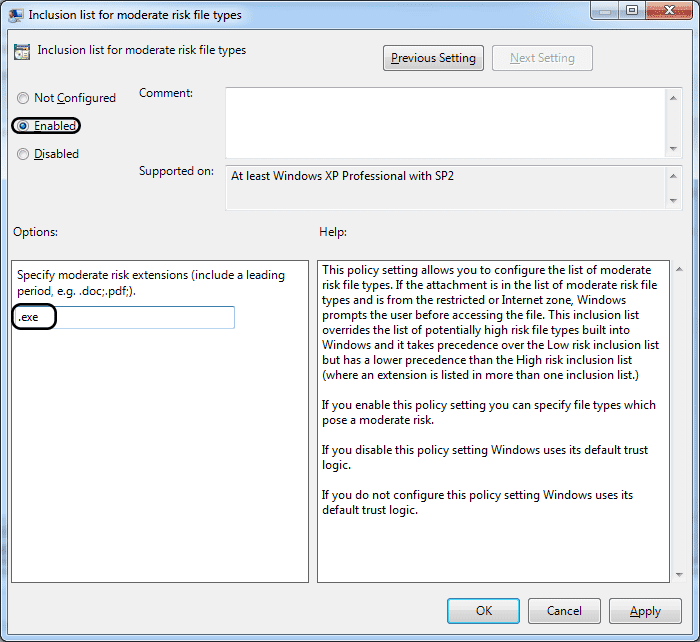
Step 5: Alright after opening up a lot of folder in Local Group Policy Editor we have finally reached the option which we gonna edit. Double click on the Inclusion list of moderate risk files to open up it up. Select the Enable option from the three radio button present at the top to enable the Inclusion list of moderate risk files. In the Options present in the middle type the .exe as shown below and click on OK to save the changes. That's all you will not be annoyed by the IDM or any other .exe file type open file security warning unknown publisher.

Add To Google BookmarksStumble ThisFav This With TechnoratiAdd To Del.icio.usDigg ThisAdd To RedditTwit ThisAdd To FacebookAdd To Yahoo

Thursday, May 30, 2013

how to Crack IDM [Internet Download Manager]


Hello Friends

concept behind this crack is simple, you will understand how it works after reading this ..

first download latest version of IDM from below official link

now simply press windows key+r (it will brings up run command box) 

type the following text and click enter:
Code:
drivers

open folder named etc copy the file "hosts"

paste it some where else and open it with notepad.
now add these below lines at the end 
Code:
127.0.0.1 tonec.com
127.0.0.1 www.tonec.com
127.0.0.1 registeridm.com
127.0.0.1 www.registeridm.com
127.0.0.1 secure.registeridm.com
127.0.0.1 internetdownloadmanager.com
127.0.0.1 www.internetdownloadmanager.com
127.0.0.1 secure.internetdownloadmanager.com
127.0.0.1 mirror.internetdownloadmanager.com
127.0.0.1 mirror2.internetdownloadmanager.com

save the file and now copy this file to the drivers\etc folder(replace the file)

now open IDM and click on Registration.
now enter Name: Cracked by Vishal
last name: Hacked

in field of Serial Key enter any of the following Keys:
Code:
RLDGN-OV9WU-5W589-6VZH1
HUDWE-UO689-6D27B-YM28M
UK3DV-E0MNW-MLQYX-GENA1
398ND-QNAGY-CMMZU-ZPI39
GZLJY-X50S3-0S20D-NFRF9
W3J5U-8U66N-D0B9M-54SLM
EC0Q6-QN7UH-5S3JB-YZMEK
UVQW0-X54FE-QW35Q-SNZF5
FJJTJ-J0FLF-QCVBK-A287M

And click on ok to register.
and the next time u open Idm open with as Admin Privilages.

thats it Smile
finished ..

Add To Google BookmarksStumble ThisFav This With TechnoratiAdd To Del.icio.usDigg ThisAdd To RedditTwit ThisAdd To FacebookAdd To Yahoo

Monday, June 4, 2012

IDM Download Free Full Version


IDM Free Download Full Version Latest Free Internet Download Manager with Crack and Serial Number with Key is available for free Download. Internet Download Manager Full Version Free Download is a free downloader that is used to download files and videos from youtube with 5 times increasing speed.

IDM Free Download Full Version Internet Download Manager has integrated dynamic file downloading system to grab the link and download the files with resume speed.


Add To Google BookmarksStumble ThisFav This With TechnoratiAdd To Del.icio.usDigg ThisAdd To RedditTwit ThisAdd To FacebookAdd To Yahoo